
Seedream 5.0 Pro by ByteDance is now in ImagineArt. Now you can edit AI generated images the way you would in Photoshop. We're talking ten editable layers: text, subject, background, even the bits hidden behind the subject. Drag them, resize them, swap the subject out entirely.
Seedream 5.0 Pro AI Image Generator: Seedream Pro AI
Create/edit image online with Seedream 5.0 Pro powered by Bytedance Seedream AI. Generate text-to-image visuals, upload reference images, and refine product details for polished ecommerce, branding, and social media assets.
Image Examples of Seedream 5.0 Pro AI Image Generator
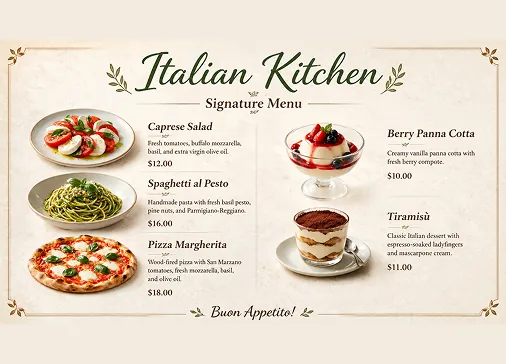
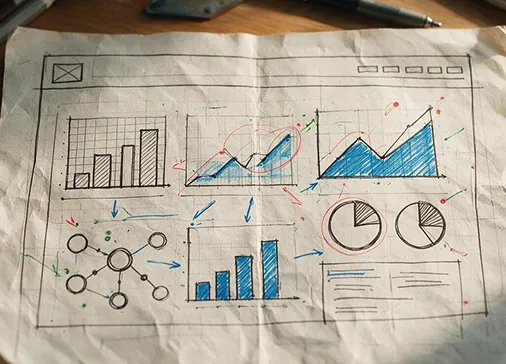
Explore how Seedream 5.0 Pro creates carbon footprint infographics, documentary-style photos, poolside portraits, split-level nature scenes, retouching annotation edits, coffee machine ecommerce pages, anime action storyboards, trail running campaigns, text-heavy posters, multilingual layouts, product ads, brand visuals, social covers, and cinematic concept frames.
Example created by Seedream 5.0 Pro AI Image Generator

Core Features of Seedream 5.0 Pro AI Model
Seedream 5.0 Pro combines text-to-image generation, image-to-image editing, reference image control, precise local edits, multi-layer visual control, readable text layouts, multilingual generation, and cinematic image quality.
Text and Reference Image Generation
Start from a detailed prompt, upload reference images, or combine both workflows to create new visuals, refine existing photos, control layout, and preserve the creative direction.
Precise Local Editing
Modify selected objects, colors, labels, backgrounds, lighting, or product details without rebuilding the whole image, helping preserve composition, textures, shadows, and scene consistency.
Layered Composition Control
Use a layer-style workflow to adjust objects, backgrounds, lighting, effects, and visual elements separately, making complex posters, ads, product pages, and structured designs easier to refine.
Readable Text and Multilingual Layouts
Create information-rich images with clearer small text, multilingual copy, structured visual hierarchy, education graphics, PPT-style slides, product pages, and campaign layouts.
Advantages of Seedream 5.0 Pro AI Image Generator
Seedream 5.0 Pro helps creators, marketers, ecommerce teams, designers, educators, and brands produce polished image assets when detail, layout, realism, and repeatable editing matter.
Professional Visual Quality
Generate cinematic images with refined lighting, realistic materials, natural shadows, detailed textures, stronger composition, and polished output quality for commercial and creative work.
Better Control for Commercial Edits
Adjust product labels, colors, backgrounds, element placement, poster layouts, and campaign details while keeping untouched regions stable and visually consistent.
Stronger Complex Prompt Understanding
Handle multi-subject scenes, detailed layout instructions, high-density information design, brand references, social trends, and professional creative briefs with clearer structure.
Ready for Downstream Design
Prepare product images, transparent assets, poster drafts, social covers, brand visuals, and strong image frames that can move into ecommerce pages, slides, ads, or AI video workflows.
Use Cases for Seedream 5.0 Pro AI Image Generator
Seedream 5.0 Pro supports practical AI image generation and editing workflows for ecommerce, advertising, branding, social media, education, infographics, product design, and visual storytelling.
1
Ecommerce and Product Images
Create product detail pages, catalog visuals, packaging concepts, listing images, store banners, lifestyle product scenes, and conversion-focused ecommerce posters with accurate layout and color control.
2
Marketing and Advertising Campaigns
Design ad creatives, social banners, campaign posters, launch visuals, brand key art, event graphics, and promotional concepts with consistent style and precise text or label edits.
3
Infographics and Education Visuals
Generate high-density infographics, PPT-style slides, learning graphics, multilingual explanatory visuals, data-rich layouts, and structured content images with more readable text.
4
Concept Frames and Social Content
Create cinematic stills, anime action frames, storyboards, reels covers, social posts, creator visuals, trend-aware graphics, and strong first frames for video planning.
See What Users Create with Seedream 5.0 Pro AI Image Generator
How to Use Seedream 5.0 Pro AI Image Generator
Create or edit a professional AI image with Seedream 5.0 Pro in three simple steps.


