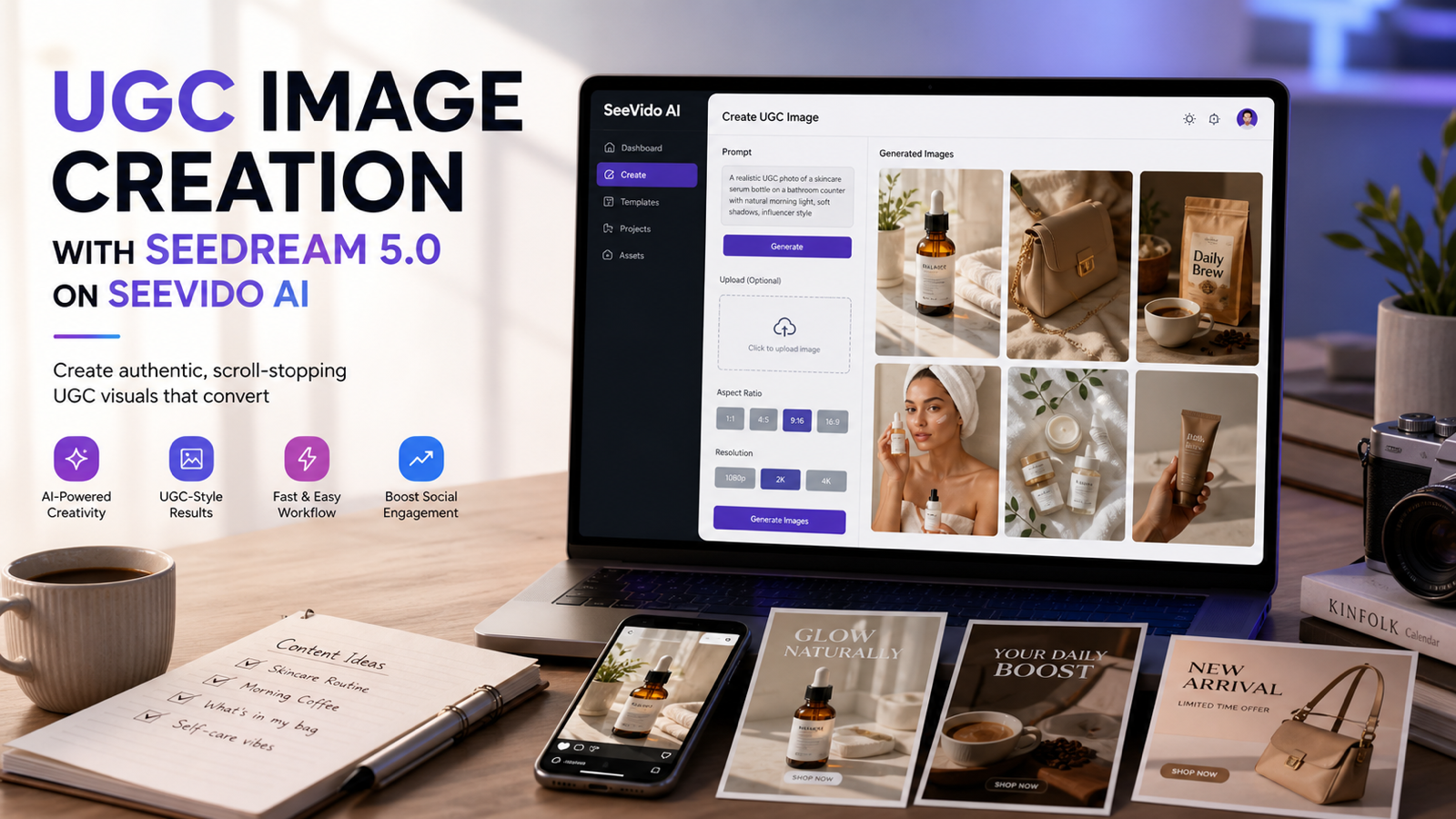
UGC Image Creation with Seedream 5.0 is becoming a practical workflow for creators, marketers, e-commerce teams, TikTok advertisers, and AI content studios that need more product visuals than a traditional shoot can easily produce. Instead of treating AI images as final campaign assets on the first try, the better approach is to use Seedream 5.0 for rapid concept testing, creator-style product photography, lifestyle scenes, and social ad image variations that can be reviewed and edited by a human.
On SeeVido AI, Seedream 5.0 fits into a broader creative workspace that includes AI image generation workflows alongside Seedance and other multimodal tools. That makes it useful for teams that want product images, creator visuals, and short-form social marketing assets to live in the same production pipeline.

What Seedream 5.0 Is in a Modern AI Image Workflow
Seedream 5.0 AI Image Generator is presented by SeeVido as a Bytedance Seed AI powered image model for text-to-image and image editing workflows. In practical terms, that means creators can enter a prompt, use reference images where supported, choose output settings such as ratio or resolution, generate visual options, and refine the result until it fits a campaign direction.
For UGC image work, the value is not only image quality. The bigger value is iteration speed. A marketer can test a skincare counter scene, a fashion mirror selfie, a product unboxing desk shot, or an e-commerce lifestyle hero without organizing a full shoot for every idea.
The best results usually come from prompts that describe the product, creator context, camera angle, lighting, platform aesthetic, and marketing goal. Seedream-style models are especially useful when the brief is visual and scenario-based: "a creator-style product photo for a TikTok ad thumbnail" is clearer than "make this product look good."

Why Seedream-Style Models Work Well for AI UGC Image Generation
Seedream-style image models are useful for AI UGC image generator workflows because they can quickly create many creator-style visual directions from one product idea. Instead of producing one polished catalog image, the goal is to explore scenes that feel native to social platforms: bathroom counter photos, desk setups, coffee shop shots, mirror selfies, flat lays, unboxing moments, and lifestyle posts.
This matters because UGC images often work through context. A product on a white background can show shape and color, but a product in a natural creator setting can communicate routine, use case, scale, and mood. A beauty brand may need a soft morning skincare visual. A gadget seller may need a creator desk image. A home decor brand may need a Pinterest-style room scene.
Use Seedream 5.0 for fast creative testing when you need:
- AI creator-style images for social posts and thumbnails.
- AI product lifestyle photos for e-commerce and ad testing.
- AI influencer-style images without using real influencer likenesses.
- AI fashion product photography and outfit-focused creator visuals.
- AI vertical social visuals for paid and organic content planning.
Human review still matters. AI-generated UGC should be treated as draft creative or concept material until someone checks product accuracy, brand fit, platform rules, and commercial usage requirements.

A Simple SeeVido AI Workflow for Creator-Style Product Photos
SeeVido AI is a practical browser-based place to test Seedream 5.0 because the workflow is direct: open the image tool, enter a prompt, upload a reference image if the workflow calls for one, choose ratio or resolution settings, generate, review the result, and refine the prompt. SeeVido also presents related creative tools for image, video, and social content workflows, which helps teams connect AI product photography with short-form marketing production.
A simple AI UGC image workflow looks like this:
- Choose Seedream 5.0 or the relevant AI image workflow on SeeVido AI.
- Start with either a text prompt or a product/reference image.
- Write a scene-based prompt that includes product, creator setting, camera, lighting, platform style, and goal.
- Generate several variations instead of stopping at the first usable image.
- Review product shape, hands, texture, lighting, background, and brand continuity.
- Edit the best option manually or with a second prompt pass.
- Export only after checking rights, disclosure requirements, and platform ad policies.
For product teams, this is useful before a full shoot. For solo creators, it is useful for testing thumbnails, lifestyle posts, and product concepts. For agencies, it can speed up pitch decks and ad angle testing.

Reusable Prompt Formula for Seedream 5.0 UGC Images
The strongest prompts are specific without becoming crowded. For AI image generation with Seedream 5.0, use a repeatable structure that tells the model what to show, where it happens, how the camera sees it, and why the image exists.
Reusable prompt formula:
[product/subject] + [creator or lifestyle setting] + [camera angle] + [lighting style] + [social platform aesthetic] + [marketing goal]
A more detailed version:
Create a realistic UGC-style image for [product]. Show [product/subject] in [creator or lifestyle setting]. Camera: [close-up / mirror selfie / overhead flat lay / handheld smartphone angle / product hero angle]. Lighting: [natural morning light / soft indoor light / cinematic coffee shop light / premium studio light]. Style: [TikTok ad thumbnail / Instagram post / Pinterest visual / e-commerce lifestyle image]. Goal: [show product texture / demonstrate use case / make the product feel giftable / support a launch ad / create a creator-brand image]. Keep the product clear, composition clean, hands natural, and background realistic. Avoid unreadable text, fake logos, celebrity likenesses, and exaggerated results.
For product continuity, add a reference-focused line: "Use the uploaded product image as the visual reference. Preserve product shape, color, packaging structure, and key material details." Even then, check the output carefully. AI image tools may still alter labels, proportions, hands, reflections, or small details.

How to Create AI Product Lifestyle Photos for Ads and E-Commerce
An AI Product Photography Generator workflow is most useful when the product scene has a clear commercial purpose. A product lifestyle image for a TikTok ad thumbnail needs different composition than an e-commerce hero image, and a Pinterest home decor image needs different pacing than an Instagram beauty flat lay.
For AI product lifestyle photos, write the prompt around one marketing job:
- Show the product in use.
- Make the product feel premium.
- Make the product feel casual and creator-native.
- Show scale, texture, routine, or gifting context.
- Create a thumbnail with strong product focus and simple negative space.
For example, a skincare image prompt should mention the bathroom counter, natural light, product texture, soft reflections, and clean caption space. A fashion UGC prompt should mention smartphone framing, mirror angle, realistic indoor lighting, and natural pose consistency. A home decor prompt should mention cozy lighting, modern room styling, and a Pinterest-friendly vertical crop.
Avoid asking for too many outcomes in one image. If you want a product unboxing image, do not also ask for a detailed before-and-after claim, multiple backgrounds, heavy text, and a full creator face reaction. One clear scene usually beats one overstuffed prompt.

Seedream 5.0 vs Older AI Image Workflows: Consistency, Detail, and Speed
Seedream 5.0 should be evaluated as a practical workflow upgrade, not as a magic replacement for art direction. SeeVido positions Seedream 5.0 around stronger prompt adherence, detail stability, consistency across outputs, and higher-resolution content workflows. Those qualities are useful for marketing teams because UGC creative often requires many similar variations across products, hooks, and formats.
Compared with older AI image workflows, Seedream 5.0 can be more useful when you need:
| Workflow need | Older AI image workflow issue | Seedream 5.0 testing goal |
|---|---|---|
| Product lifestyle variations | Product may drift across images | Check product shape, color, and packaging continuity |
| Creator-style scenes | Images may feel too glossy or generic | Prompt for natural camera, realistic setting, and social-native composition |
| E-commerce visuals | Detail may soften or flatten | Review texture, edges, reflections, and material cues |
| Fast ad testing | Too much manual setup | Generate multiple directions, then curate |
| Social image formats | Cropping may be awkward | Prompt for 9:16, 1:1, or platform-specific composition |
The caveat is important: better consistency does not remove the need for review. If a product label, hand pose, fabric shape, logo, or claim matters legally or commercially, the image should be checked and edited before publishing.

Best Use Cases for UGC Image Creation with Seedream 5.0
UGC Image Creation with Seedream 5.0 is strongest when the goal is social-native visual exploration. It is less ideal when the campaign requires exact packaging typography, strict legal disclaimers embedded in the image, or a perfect match to a real model, location, or influencer.
Good use cases include:
- TikTok ad thumbnails with expressive product focus and clean caption space.
- Creator-style product photography for skincare, fashion, gadgets, coffee, beauty, and home decor.
- Fashion UGC images such as mirror selfies, outfit close-ups, try-on concepts, and outdoor lifestyle scenes.
- AI social media image generator workflows for Instagram, Pinterest, and campaign moodboards.
- E-commerce social graphics that support launches, bundles, seasonal promos, and product education.
- AI lifestyle marketing visuals for creative testing before paid production.
For creators, this can reduce the blank-page problem. For brands, it can multiply creative angles. For studios, it can help build pitch concepts and visual territories before spending budget on a full production day.

Copy-to-Use Seedream 5.0 UGC Image Prompts
Use these prompts as starting points for AI creator and social media images. Replace bracketed details with your own product, then generate several variations and compare which one looks most usable for your actual channel.
Create a realistic TikTok-style skincare product photo on a bathroom counter with natural morning lighting and creator-style framing.
Generate a creator-style fashion mirror selfie featuring [outfit/product] with soft indoor lighting and realistic smartphone composition.
Create a lifestyle coffee shop UGC image featuring [product] with cinematic depth of field and natural social-media aesthetics.
Generate a premium beauty-product flat lay with influencer-style composition and polished Instagram visual style.
Create a realistic product unboxing scene with natural hand placement, creator desk setup, and social-media-friendly composition.
Generate a Pinterest-style home decor promotional image with cozy lighting and modern creator aesthetics.
Create a TikTok ad thumbnail for [product] with expressive composition, vibrant lighting, and clean focus on the product.
Generate a realistic AI creator image showcasing [fashion item] outdoors with natural pose consistency and cinematic lighting.
Create a beauty influencer-style makeup product shot with premium lighting, reflections, and soft-focus background.
Generate a realistic e-commerce hero image for [product] with polished lifestyle branding and creator-style composition.
For better control, add constraints such as "no readable fake text," "no celebrity resemblance," "preserve packaging shape," "hands should look natural," "leave clean space for ad copy," or "use a simple background without clutter."

Cautions Before Publishing AI-Generated UGC Images
AI-generated UGC images are best treated as draft creative, not automatic final ads. Seedream 5.0 can help with rapid iteration and scalable ad experimentation, but human curation and editing remain part of the workflow.
Check these items before publishing:
- Product accuracy: shape, color, packaging, size, texture, and included accessories.
- Typography: AI images may produce distorted, unreadable, or incorrect text.
- Hands and bodies: creator-style images may still need review for hand consistency and natural pose.
- Brand continuity: do not assume exact continuity across all generated variations.
- Claims: avoid visuals that imply exaggerated product results or unsupported before-and-after outcomes.
- Rights: verify commercial usage rights, reference-image rights, model or likeness concerns, and stock element issues.
- Platform policy: check TikTok, Instagram, Pinterest, marketplace, and paid ad rules before launch.
- Disclosure: follow local ad disclosure and synthetic media requirements where applicable.
For paid ads, the safest workflow is generate, shortlist, manually edit, legal or brand review, then publish. AI can speed up creative testing, but it should not replace review for claims, rights, or brand safety.

How Seedream Images Fit Short-Form Social Marketing Pipelines
Many creator workflows increasingly combine AI-generated product imagery with short-form social marketing pipelines. A brand might use Seedream 5.0 to test TikTok thumbnails, then use video tools for motion concepts, product demos, or creator-style ad variations. SeeVido is relevant here because it supports AI image workflows alongside Seedance and other multimodal creative tools.
A practical pipeline can look like this:
- Generate AI product lifestyle photos for the core creative angles.
- Pick the strongest images for thumbnails, ad variations, or concept boards.
- Use the best stills as references for short video ideas or motion tests.
- Create caption, hook, and landing-page variants around the winning visual direction.
- Review performance and generate the next round of images based on what people actually click.
This approach is useful for e-commerce sellers and TikTok advertisers because it separates creative discovery from final production. You can learn which product angle feels promising before committing to a full shoot, influencer collaboration, or video batch.

Recommended Articles for Seedream, UGC Images, and Creator Workflows
Use these related resources to keep exploring AI image generation, model comparisons, and creator workflow strategy.
Related Articles:
- Qwen Image 2.0 vs Seedream 5.0: Which AI Image Generator Makes More Sense?
- Seedream 4.0 AI Image Generator Guide
- GPT Image 2 Photo Editing Guide
- GPT Image 2 Realistic Human Image Analysis
People Also Read:
- AI Image Prompting Guides for Social Media Creators
- AI Creator Workflow and UGC Image Articles
- AI Marketing Visual and Ad Creative Insights
- AI Image Model Comparisons for Creators
- AI Music and Visual Branding Workflow Articles
- AI Video and Image Creator Strategy Articles

FAQ: Seedream 5.0 AI Image Generator for UGC and Product Photos
Is Seedream 5.0 good for UGC image creation?
Seedream 5.0 is useful for UGC-style image creation when the goal is fast visual testing, creator-style product scenes, social ad thumbnails, and lifestyle mockups. Final images should still be reviewed for product accuracy, hands, text, rights, and brand safety.
Can I use Seedream 5.0 for AI product photography?
Yes, it can support AI product photography concepts such as beauty flat lays, product unboxing scenes, e-commerce lifestyle images, fashion visuals, and social media graphics. For exact packaging or strict commercial requirements, use reference images and review every output carefully.
What makes a good Seedream 5.0 UGC image prompt?
A strong prompt includes product, creator setting, camera angle, lighting style, social platform aesthetic, and marketing goal. It should also include guardrails such as no fake logos, no unreadable text, natural hands, realistic lighting, and clean product focus.
Should AI-generated UGC images replace real creator shoots?
Usually no. They are better for rapid iteration, concept testing, moodboards, and scalable ad experimentation. Real shoots, human creators, product samples, retouching, and compliance review are still valuable for final campaigns.

Conclusion: Use Seedream 5.0 for Fast UGC Image Testing, Then Curate
Seedream 5.0 AI is a practical option for creators and brands that need more AI product lifestyle photos, creator visuals, AI TikTok ad images, and social media concepts without slowing down every idea into a full production cycle. On SeeVido AI, it fits a broader image and video creation workflow, which makes it especially useful for teams building content pipelines across still images, thumbnails, and short-form social campaigns.
The best mindset is simple: use Seedream 5.0 to create more creative directions faster, then let human judgment decide what is accurate, on-brand, legally usable, and worth publishing. That balance is where AI-generated UGC becomes useful instead of risky.